
Trying to make a Qidian account from outside China so you can unlock the latest chapters of that xianxia you're binging? The short version: set up WeChat with your phone number, scan the WeChat login QR code on Qidian, top up Qidian coins with PayPal, then subscribe to the VIP chapters you want. No Chinese phone number or Chinese bank card needed. The whole thing takes about 15 minutes.
Introduction
Qidian (起点中文网) is a Chinese web novel platform run by China Literature, and it's where a huge share of xianxia, xuanhuan, system and other male-lead web novels get published first. If a cultivation novel on your favourite translation site has a few hundred chapters but it's been dropped, there's a good chance the raws are on Qidian.
The first chunk of most Qidian novels is free. Once you hit the VIP chapters, you need an account and some Qidian coins (起点币). Signing up is the annoying part, since the regular account login wants a phone number Qidian will accept. Logging in with WeChat skips most of that, which is why it's the route this guide uses.
The site is all in Chinese, so turn on your browser's built-in translate before you start. On Chrome desktop, right-click anywhere on the page and pick "Translate to English." The screenshots below are a mix of the translated and untranslated site, so the button text might look slightly different on your screen.
How Do You Make a Qidian Account and Buy Chapters?
Here's the full flow, from a brand new WeChat account to your first unlocked VIP Qidian chapter.
Step 1: Set up WeChat on your phone
Download WeChat from the App Store or Google Play and register with your phone number. International numbers work fine.
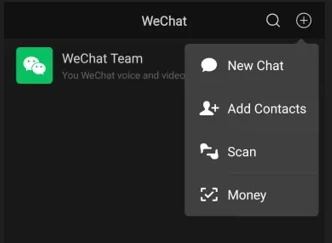
Once you're in, tap the + in the top right corner and open Scan. You'll use this in the next step.
Step 2: Log in to Qidian with WeChat
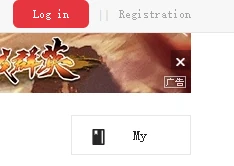
Go to qidian.com on your computer and click Log in in the top right.
In the login box, pick the third tab, 微信登录 (WeChat login).

Tick the checkbox at the bottom to agree to the terms, then click the red button. A QR code pops up.

Scan it with WeChat's Scan option and approve the login on your phone. That creates your Qidian account and links it to WeChat in one go.
Step 3: Finish setting up your account
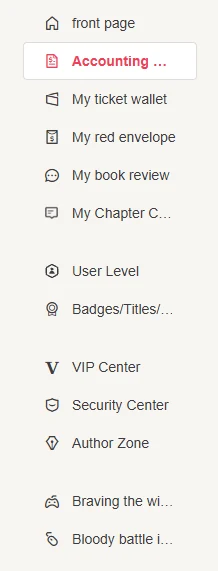
Head to my.qidian.com, your personal center. Set a nickname here so you're not stuck with a random string of numbers.

Then open Security Center in the left sidebar and bind an email and phone number. This is your backup if you ever lose access to WeChat, so don't skip it.
Step 4: Find your novel
Qidian's search won't find a novel by its English fan title. Grab the Chinese title from the novel's NovelUpdates page (it's listed under "Associated Names") or from NovelList, and paste that into Qidian's search bar.
Open the novel's details page and click Join Bookshelf so you can find it again easily. Read the free chapters with Free Trial Reading first, so you know you actually like the raws before you spend anything.
Tip: Under Interactive Voting, you can cast a Recommended Ticket for the novel with Vote Now. It's free, you get tickets just for being logged in, and it pushes the book up Qidian's rankings.
Step 5: Top up Qidian coins with PayPal
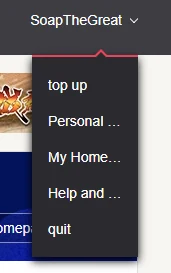
Hover over your nickname in the top right corner and click top up.
The payment options are Alipay, WeChat Pay, QQ Wallet, PayPal and Taiwan ATM. Pick PayPal, which is the easiest one for overseas readers since you can fund it with a regular credit or debit card.
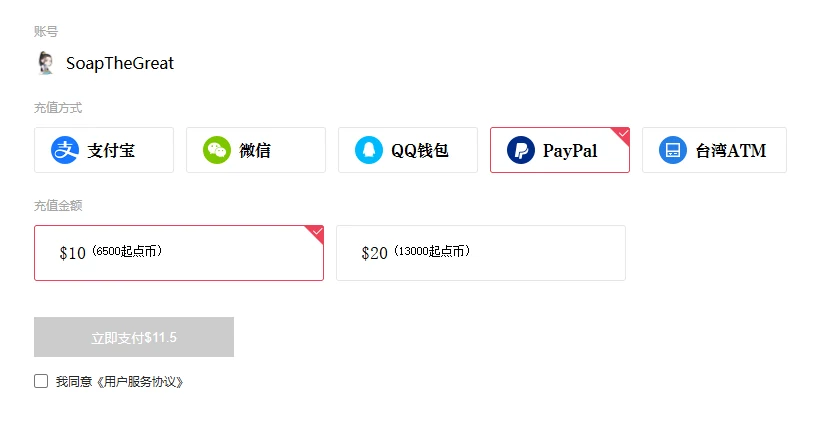
Choose an amount. The $10 option gives you 6,500 Qidian coins, and you'll pay about $11.50 once PayPal's fee is added. Tick the user agreement checkbox, click the pay button, and finish the payment in PayPal.
Step 6: Subscribe to VIP chapters
Go to the first locked VIP chapter of your novel and click the subscribe button. You get three choices:
- Single chapter - buy just this one chapter.
- Auto-subscribe - every chapter you open after this gets bought automatically.
- Bulk subscribe - buy a batch of chapters at once.
Once a chapter is subscribed, it stays unlocked on your account, and you can read it on the website whenever you want.
How Much Do Qidian Chapters Cost?
Qidian prices VIP chapters by length, not by chapter count. Regular readers pay around 5 coins per 1,000 Chinese characters, and most chapters land somewhere between 2,000 and 4,000 characters. That works out to roughly 10 to 20 coins per chapter, so the $10 top-up (6,500 coins) covers a few hundred chapters.
A few things affect what you'll actually pay:
- Your fan level - Qidian gives discounts to higher-level members, so the per-chapter price drops the more you read and spend.
- Chapter length - longer chapters cost more. Some authors post chunky 6,000-character chapters.
- The PayPal fee - the $10 pack costs about $11.50 at checkout, so factor that in.
Compared to buying an officially translated version (when one even exists), Qidian raws are cheap. The catch is they're in Chinese.
How Do You Read Qidian Chapters in English?
Browser translate is fine for clicking around the site, but it's not great for actually reading a novel. Names change from one paragraph to the next, cultivation terms are inconsistent, and pronouns flip around.
That's where a tool like OpenNovel comes in. It supports Qidian, including most paid and VIP chapters you've subscribed to, and it uses AI translation with a glossary, so character and terminology stays consistent. All you need to do is copy the Qidian chapter link, and paste it into OpenNovel to have it translated. It's free to try and works on web, iOS and Android. The getting started guide walks you through setup.
If you're looking to purchase from other Chinese webnovel platforms, our rundown of Chinese novel websites covers JJWXC, Faloo, Ciweimao and the rest.
What Common Mistakes Should You Avoid?
- Searching the English title. Qidian only knows the Chinese title. Copy it from NovelUpdates instead of guessing.
- Topping up before reading the free chapters. Most novels give you dozens of free chapters. Read some raws first to make sure the novel holds up.
- Leaving auto-subscribe on. It's handy while you're binging, but it'll quietly spend coins on every chapter you open. Turn it off if you only meant to buy a few.
- Skipping the Security Center. If your account is only tied to WeChat and something happens to your WeChat, you lose your bought chapters with it. Bind an email and phone number.
- Forgetting the PayPal fee. The $10 top-up is about $11.50 at checkout, so don't be surprised by the charge.
Frequently Asked Questions
Can I make a Qidian account without WeChat? Yes, the login box also has a QQ login tab and a regular account login. Both of those generally want a phone number too, and the regular sign-up can be picky about non-Chinese numbers. For most overseas readers, WeChat is the least painful route.
Do I need a Chinese phone number for Qidian? No. WeChat accepts international phone numbers, and once you log in to Qidian through WeChat, you don't need a Chinese number for anything in this guide. You can bind your own number in the Security Center afterward.
Can I pay on Qidian with a credit card? Not directly. The top-up page offers Alipay, WeChat Pay, QQ Wallet, PayPal and Taiwan ATM. PayPal is the easiest workaround, since you can link a regular credit or debit card to your PayPal account.
Is Qidian the same as Webnovel? They're run by the same parent company, China Literature. Webnovel is the international, English-language site, and only a small slice of Qidian novels get official translations there. Everything else is only on Qidian in Chinese, which is why so many readers buy the raws and translate them.
Can OpenNovel translate Qidian VIP chapters? Yes. OpenNovel supports Qidian paid and VIP chapters, as long as you've subscribed to them on your own account first. If a chapter isn't translating properly, ask in the OpenNovel Discord and someone will help you sort it out.